The steps to take Content Manager offline are as follows:
- Schedule a time for the outage ensuring members know they will not be able to use Content Manager during this time
- At the appointed time Open Enterprise Studio
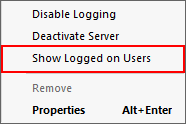
- Right-click your Workgroup Server and select Show Logged on Users
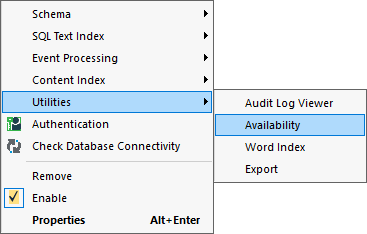
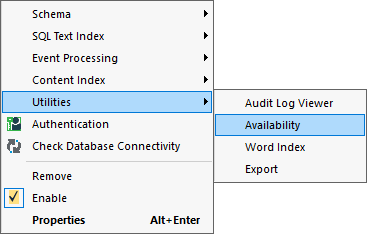
- Right-click on a dataset using Oracle > Utilities > Availability
- In this window, select Stop all dataset activity and type an appropriate message
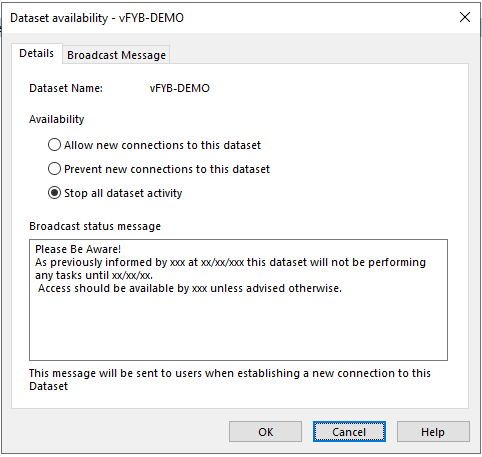
- Click OK
- Repeat steps 3-6 for all Datasets to be taken offline
- This will stop users connection to the dataset but will not take it offline, however is still an important step to be completed first
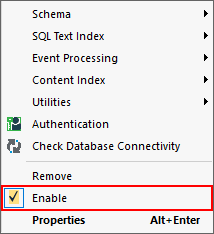
- Right-click each dataset that has been set to stop all dataset activity and untick Enable (this will take it offline)
- Click Save then Deploy (This will roll out the change)

Turning everything back on is similar to reverse with one important change:
- Right-click each dataset you previously unticked Enable and tick Enable
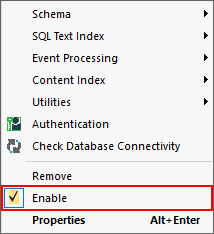
- Right-click on each database previously set to Stop all dataset activity > Utilities > Availability
- In this window, select Allow new connections to this dataset and Remove the Broadcast Message!
- If you do not remove the Broadcast message it will appear for every user at every login
- Click OK
- Click Save then Deploy

FYB offer training on Content Manager Technical Support and Troubleshooting.
Click here for more information